
Finance Tips
How to Use and Pay Shopee, Lazada, and TikTok PayLater in the Philippines
PayLater has become one of the easiest ways to shop online in the Philippines. Shopee, Lazada, and TikTok all offer it, letting you get your items now and pay for them later. This guide shows you how to activate, use, and pay each one, including how to pay through GCash and Maya. Simple language, made for regular shoppers.
💡 Highlights
- All three apps, Shopee, Lazada, and TikTok, have their own PayLater, activated inside the app with a valid ID.
- You use PayLater at checkout by choosing it as your payment method, then paying in full next month or by installment.
- You pay your PayLater bill inside the same app, and you can use GCash, Maya, a bank, or over-the-counter options.
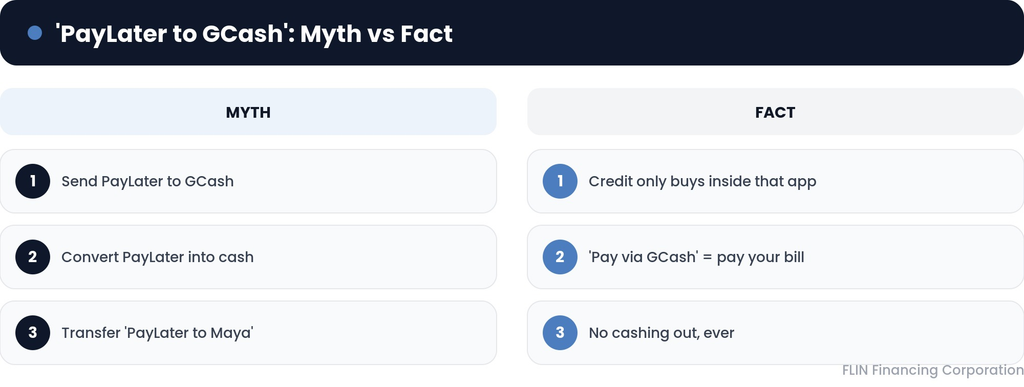
- You cannot transfer or convert PayLater credit into GCash or Maya cash. Paying “via GCash” means paying your bill, not cashing out.
- Paying on time and using PayLater regularly is how your limit gets raised.
- PayLater is a form of debt, so only buy what you can pay back.
One Thing to Know Before You Start
PayLater is borrowed money, not free money. When you use it, you are taking a small loan that you pay back later, usually with a fee or interest if you choose installments. So treat it like any debt and only spend what you can repay.
Also, clear up one common mix-up. A lot of people search how to send “PayLater to GCash” or “PayLater to Maya.” You cannot do that. PayLater credit can only be used to buy things inside that app. When we talk about paying “using GCash” or “using Maya,” we mean using your GCash or Maya balance to pay your PayLater bill, not turning PayLater into cash.
How Do You Use and Pay Shopee PayLater (SPayLater)?
How to activate SPayLater
As shown in Shopee’s own guide, activation happens inside the app:
- Open the Shopee app and tap the “Me” tab.
- Tap “SPayLater,” then “Activate Now.”
- Enter the OTP code sent to your mobile number.
- Upload a photo of your valid government ID and complete the facial verification.
Approval is not automatic for everyone, since Shopee checks eligibility.
How to use SPayLater
At checkout, choose SPayLater as your payment method. Then pick your term: pay the full amount next month, which is usually interest-free, or spread it over 3, 6, or 12 monthly installments, with the fee shown beside each option.
How to pay your SPayLater bill
Bills come out around the 1st of each month. To pay, open the Shopee app, tap “Me,” tap “SPayLater,” then tap “Pay Now” and choose your payment method. As payment guidance explains, you can pay through ShopeePay, GCash, Coins.ph, partner banks, and over-the-counter channels. To pay with GCash, select GCash at the “Pay Now” step, then confirm through the GCash prompt.
How to increase your SPayLater limit
There is no instant button for this. As Shopee guidance notes, Shopee raises your limit based on good behavior, so keep using SPayLater and paying your bills on time, and your limit tends to go up over time.
How Do You Use and Pay Lazada PayLater?
Where to find and activate it
Lazada PayLater lives inside your Lazada Wallet, so you need an active Lazada Wallet first. Open the Lazada app, go to the “Account” tab, find Lazada Wallet or PayLater, and follow the steps to activate, which include submitting an ID and verifying your details.
How to use it
At checkout, select Lazada PayLater as your payment method, then choose to pay next month or by installment, just like the others.
How to pay your Lazada PayLater bill
Go to the PayLater section inside your Lazada app and settle the amount due. You can pay using GCash, a bank, or the other methods Lazada lists. As with Shopee, paying “to GCash” is not possible, you simply use your GCash balance to pay the bill.
How Do You Activate, Use, Pay, and Deactivate TikTok PayLater?
What it is
As stated on TikTok’s official seller information, TikTok PayLater gives you credit of up to 50,000 pesos to spend on TikTok Shop, repayable in up to 12 installments. Your occupation and monthly income help decide your limit. Note that it is a limited rollout, so not every account has it yet, and you need the regular TikTok app updated to the latest version.
How to activate it
Based on common TikTok PayLater guides:
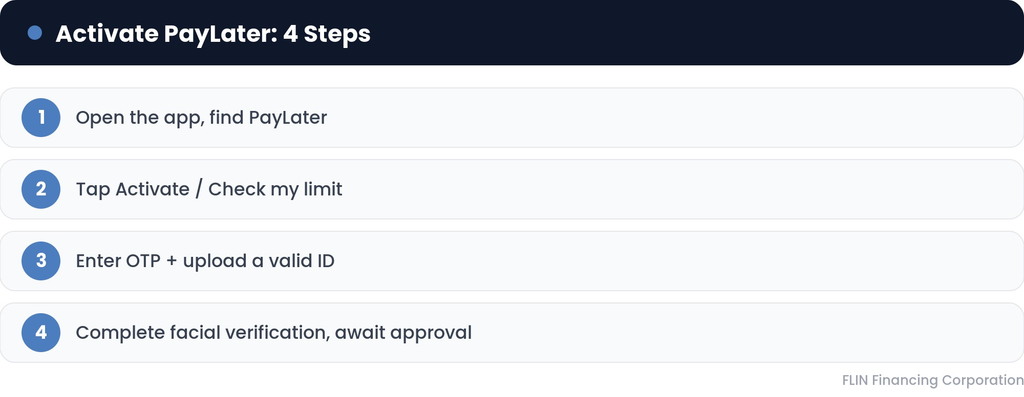
- Open the TikTok app and go to the Shop tab.
- Find and tap PayLater, then tap “Check my limit” or “Activate.”
- Enter your details and upload a valid ID, then complete the facial verification.
- Wait for approval, which is often quick.
How to use it
When buying on TikTok Shop, tap Buy Now, go to Checkout, select TikTok PayLater as the payment method, choose your installment plan, then place your order.
How to pay your TikTok PayLater bill, including via GCash or Maya
Go to the PayLater or orders section in TikTok Shop and pay the amount due. You can link and use GCash or Maya to settle it, or pay through a bank. Choose GCash or Maya at the payment step and confirm through the wallet’s prompt.
How to deactivate TikTok PayLater
Make sure your balance is fully paid first, since you cannot close an account that still owes money. Then go to your PayLater settings inside the app to deactivate it, or contact TikTok support if the option is not showing.
How Do You Use Any PayLater Wisely?
A few simple habits keep PayLater from becoming a problem. Pay your bill in full and on time whenever you can, so you avoid penalties and interest. Keep track of how many PayLater plans you have running at once across the three apps, since they add up fast. And before you tap “PayLater,” ask yourself if you could pay for the item in cash. If the answer is no, it is safer to skip it.
When PayLater Balances Cannot be Controlled
PayLater feels small one purchase at a time, but a few balances across Shopee, Lazada, and TikTok, plus a credit card or a loan, can quietly grow into more than you can handle. If you are juggling several balances and struggling to keep up, the fix is not to open another PayLater or a loan app.
FLIN helps salaried Filipinos combine high-interest debts, credit cards, online loans, and buy-now-pay-later balances, into one more manageable monthly payment. Tell us your problem, then we can start to give you well-designed solution to get you free from the debt. Click below for free consultation!
Find out more about tips in managing paylater debts:
Your Debt-Free Life Start Here
Consult with us and get the best solution based on your financial condition

SEC Registered
SEC Registration number : 2026040247321-01